
Layers and people
A layer is one set of comments on a site, such as “Client review” or “QA, sprint 14”. Layers keep rounds of review apart, and decide who sees what.
Who people are
On a site with the script, you install it; the people on the page decide who they are. There are three ways in, all from the toolbar:
- Guest. A display name and nothing else. Guests can read and write comments on the site's public layers. Their session is kept in the browser, so they keep their name on return visits. If they make an account later, what they wrote comes with them.
- Email and password. A full account, the same one used for the dashboard and the extension.
- Google. Opens a small popup on
sharedlayers.com, which completes sign-in and hands the session back to the page. Available only when the script was installed with an embed key, because the popup verifies the calling site against that key.
Sessions are stored in the visitor's browser on your site's origin. Nothing about your own visitors' accounts on your site is read or touched. In the extension, people sign in from its popup in the browser's toolbar.
Who can do what
- Anyone on the page can read comments on public layers, signed in or not.
- Anyone signed in, including guests, can leave comments and replies, react, and resolve or reopen any comment on a layer they can see. Resolving is the one change a non-author may make.
- Editing and deleting a comment is for its author.
- Creating a new layer requires an account, not a guest session.
The layer menu
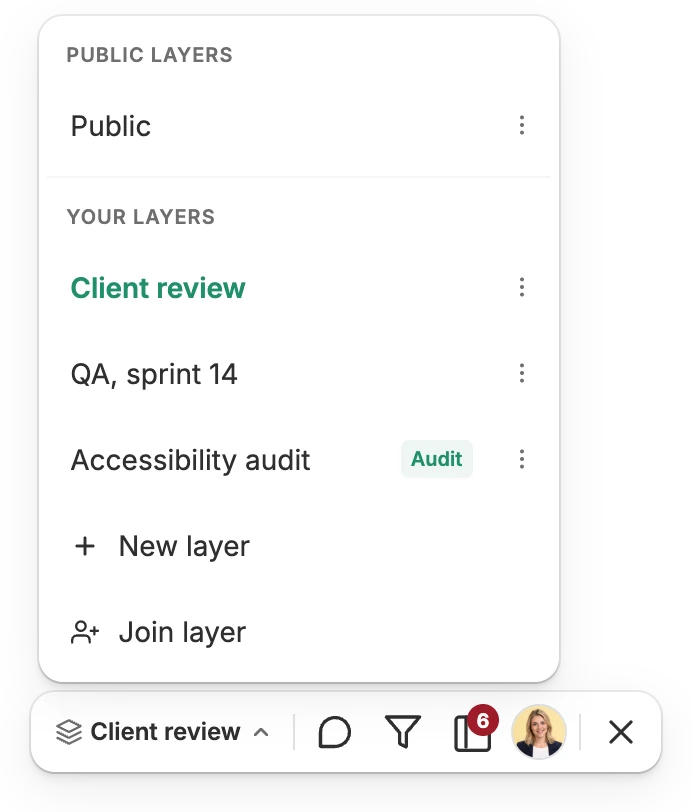
The layer's name at the left of the toolbar opens the menu, which switches between the layers you may see and remembers your choice for each site. It lists:
- Public layers first: visible to everyone on the page. A site starts with one, its default Public layer.
- Your layers: visible only to the person who made each and the people they invited, including layers made with the extension on the same site.
- New layer, which asks for a name and a kind, and Join layer, for a layer someone gave you an access key to.
The ⋯ next to a layer has Copy link and Invite people on a public layer, and Share, Rename and Delete on your own. The site's owner can rename the default Public layer and manage every public layer. A link can open a particular layer; see Deep links.
Each layer belongs to the address it was made on, so staging and production have their own.
Inviting people
- Into your own layer: Share in its menu invites people by email, or gives you its access key to pass on. The people invited join from the email; anyone with the key can join with Join layer, or from the extension's popup.
- Into a public layer, the default Public layer included: anyone signed in with an account can invite people by email, with Invite people in its menu. Everyone on the page can already read it; being invited makes them members, so they get the layer's emails and can be mentioned with @ in its comments.
Invitations are also listed under Invitations in the dashboard. On the free plan a layer can have up to five people; on Pro there is no limit.
Layers in the dashboard
The dashboard's Layers page lists every layer you own or belong to, by site. From there you can open a layer on its page, change its settings and notifications, pick its Slack channel, and export it.